Mobile biometric attendance should record more than a face or fingerprint and a device clock. A trustworthy event connects a verified worker with an approved shift, project or task, permitted capture location, managed device, reliable time source, explicit online or offline state, and an auditable exception path. GPS can add location context; it does not prove who presented. Biometrics can strengthen identity; they do not prove the worker was scheduled or productive.
Start by defining what the attendance event must prove
A fixed office clock usually operates in a known place, on managed power and network, under visible supervision. Field attendance removes those assumptions. A phone may be personal or company-owned. A rugged tablet may move between crews. The device clock may be wrong. A position fix may be old, inaccurate, or unavailable. A supervisor may capture a group after the shift has already started. An event may remain offline for hours or days before reaching HRM.
The design should therefore separate the claims inside each transaction instead of presenting one green tick as universal proof.
| Claim | Possible evidence | What it supports | What it does not prove alone |
|---|---|---|---|
| Who | Face, fingerprint, iris, palm, or claimed identity plus biometric verification | Links the event to an enrolled worker with measured confidence | Shift eligibility, location, work performed, or permission |
| When | Server time, trusted device time, capture time, synchronization time | Places the event in a traceable time sequence | That the clock was honest unless its source and changes are controlled |
| Where | Managed checkpoint, GPS, network, beacon, QR site marker, supervisor selection | Adds capture-location context with known precision | The identity of the person or exact movement throughout the day |
| Why | Shift, project, task, work order, visit, call-out, or crew assignment | Connects time to the correct business purpose | That the work was completed or met quality and safety requirements |
| How | Device identity, app version, operator, modality, online state, integrity checks | Shows how the record was created and how much trust to place in it | That a device remained secure unless it is monitored and managed |
| Outcome | Accepted, late, outside zone, duplicate, unmatched, pending, manually reviewed | Preserves the policy decision and exception trail | That every unusual event represents misconduct |
Identity, location, and attendance are different questions
A location coordinate can show where a device reported itself within a stated accuracy. It does not establish who held the device. A successful biometric comparison can establish that a presented sample matched an enrolled worker. It does not establish that the device was at the assigned client site. A timestamp records when software says an event occurred. It does not establish that the worker belonged to that shift.
A strong mobile workflow combines these signals proportionately. It also records uncertainty. If location is unavailable but a worker is verified on a managed crew tablet, policy may accept the event with a flag. If a personal phone reports an approved geofence without a trustworthy identity step, it may require another factor or supervisor review.

Connect the event to the current workforce record
The worker may be correctly identified but inactive, on leave, assigned to another project, outside the approved shift window, or missing a current site induction. Biometriya HRM can interpret the event against employee, schedule, leave, project, and attendance data. For external teams, Contractor Management and Site Access can provide current company, worker, assignment, document, and readiness status.
This prevents the mobile device from becoming an isolated database of names. The device captures evidence; the workforce platform owns the business interpretation, approvals, corrections, and reports.
Choose the operating model before choosing the device
“Mobile attendance” describes several very different workflows. Selecting one app for every population often produces either weak evidence or unnecessary friction. Begin with crew structure, travel pattern, supervision, risk, connectivity, expected volume, and who owns the capture device.
- Rugged tablet carried by a supervisor or gate operator
- Tablet fixed temporarily at a depot, bus point, or workfront
- Individual workers verify on one enrolled device
- Strong device control and consistent application configuration
- Best where the organization manages crews and equipment
- Individual capture through a mobile workforce application
- Location and device context collected with clear purpose
- Greater device diversity and higher integrity variation
- Needs stronger account, app, device, and spoofing controls
- Best where workers operate independently across many locations
Fixed mobile hubs for depots and transport points
Some distributed workforces still converge at a known point: a bus pickup, logistics depot, muster area, client reception, temporary gate, or project office. A rugged tablet or portable biometric station can operate as a managed attendance hub without permanent access infrastructure. This supports fast recurring verification and a consistent location context.
The arrival event should be named accurately. Clocking in at a transport point may establish attendance for paid travel under the organization's rules, but it does not prove arrival at the workfront. If both milestones matter, record both rather than stretching one event to represent the entire journey.
Supervisor-assisted crew attendance
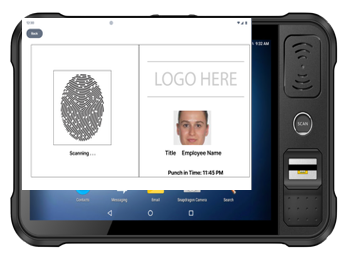
A supervisor can carry a device such as BMBT 2 and verify workers individually at a remote workfront. The operator account, crew list, site, shift, and reason for manual changes should be recorded. The supervisor should not simply tick names without identity evidence when the purpose of the system is to prevent proxy attendance.
Group capture also needs queue and exception design. Ready workers should move quickly. A damaged finger, changed appearance, missing assignment, or unrecognized person should move to an assisted path instead of causing the supervisor to bypass verification for the whole crew.
Rugged handheld verification for widely distributed work
Utilities, maintenance, inspections, security patrols, field service, shutdowns, and asset operations may need verification at many small or changing locations. Aegis can provide rugged mobile identity capture where a full tablet is not the preferred form factor. The workflow can associate the verified person with the active site, work order, checkpoint, or call-out.
Personal-phone attendance
A phone app can scale across independent workers without distributing a specialist device to everyone. It also operates in the least controlled environment. Device models, operating-system versions, camera quality, permissions, rooting or jailbreaking, emulators, virtual cameras, mock location, screen replay, shared accounts, and stolen sessions all affect trust.
The design should decide whether a phone event is self-declared, biometric-verified, device-attested, supervisor-confirmed, or some combination. A consumer phone unlock using face or fingerprint normally authenticates the device user locally; it is not automatically the same as comparing a workforce biometric against the organization's enrolled identity for the attendance transaction.
Design offline operation as a controlled state, not a data delay
Remote attendance cannot treat “no signal” as an exceptional surprise. Mines, construction areas, basements, offshore locations, warehouses, rural routes, and client sites can all have intermittent connectivity. The app needs an explicit offline policy covering who may be verified, which shifts and locations are available, how long local data remains valid, how events are protected, and what happens when the device reconnects.
Provision the managed device, app, operator, approved workers, shifts, projects, policy, and permitted offline window.
Record biometric evidence, device identity, local time, location context, assignment, and connectivity state.
Apply available identity and policy checks without pretending cached information is current forever.
Encrypt queued events, preserve sequence, detect clock or configuration changes, and prevent silent editing.
Submit events idempotently, record server receipt, resolve duplicates, and fetch current revocations and policy.
Review conflicts, late uploads, rejected events, missing shifts, corrections, and the final payroll or project outcome.
Use more than one timestamp
An offline record benefits from capture time, trusted server receipt time, and synchronization time. The application should notice manual clock changes and preserve the original event rather than overwriting it during review. Depending on risk, it may also use a monotonic sequence, last trusted server time, signed device state, or other controls to make backdating more visible.
Make synchronization idempotent
Weak connectivity causes retries. The server should recognize the same event identifier and avoid creating two clock-ins because a device submitted twice. If two devices capture competing events for one worker, the platform should keep the evidence, apply a documented rule, and route ambiguity for review rather than silently deleting whichever record arrived later.
Limit the offline trust window
A device that has not synchronized for weeks may hold former employees, expired contractors, outdated shifts, or revoked operators. Define how long cached identity and policy remain usable, what happens after the limit, which high-risk actions require online confirmation, and how an urgent suspension reaches field devices. The answer may differ for routine attendance and controlled site access.
Location needs an evidence grade
Store the source, accuracy estimate, capture age, and permission state instead of only latitude and longitude. A fresh position with useful accuracy is different from a last-known coordinate. A managed site tablet physically secured at a workfront may provide stronger location assurance than a personal phone reporting a coordinate. Where GPS is unreliable, a controlled checkpoint, site QR marker, network, beacon, operator selection, or later review can add context.
Protect the worker, the device, and the decision
Biometric templates, employee identifiers, work locations, schedules, and movement-related data can be sensitive. Collect the minimum evidence needed for the declared attendance and operational purpose. Event-level location at clock-in and clock-out may be sufficient where continuous tracking is unnecessary. Workers should understand what is collected, when, why, who can access it, how long it is kept, and how they can challenge an incorrect decision.
Plan for accuracy, fairness, and manual review
Biometric failure should not automatically become lost pay, absence, or misconduct. Provide a fast assisted route, preserve the attempted event, identify the reason, and let an authorized reviewer correct the record without erasing the audit trail. Test the selected biometric across the actual worker population, lighting, PPE, device angles, worn fingerprints, connectivity, and field conditions.
In the UK, the Information Commissioner's Office states that using biometric data to uniquely identify workers requires a data protection impact assessment and highlights the need to consider accuracy, fairness, detrimental outcomes, and manual review. Requirements differ by jurisdiction, so organizations should validate the lawful basis, consultation, notice, retention, worker rights, and alternatives applicable to each deployment.
Remote biometric capture needs spoofing and injection controls
A photograph shown to a camera, replayed video, artificial fingerprint, virtual camera, emulator, or tampered app can target different parts of the workflow. Presentation attack detection helps assess whether a live biometric source is present at the sensor. Application and device controls help address injected media and compromised endpoints. Neither layer replaces the other.
NIST's current digital identity guidelines require presentation attack detection and genuine-sensor controls in specified remote identity-proofing scenarios. Mobile attendance is a different use case, but the threat model is instructive: the system should evaluate both what is presented to the sensor and whether the capture channel itself can be trusted.
Manage enterprise devices as security assets
For company-owned tablets and handhelds, define approved hardware, operating-system patching, application signing, kiosk or work-profile configuration, encryption, screen lock, administrator control, remote lock or wipe, permission management, health monitoring, and procedures for a lost or stolen device. CISA's organizational mobile-device guidance recommends keeping managed devices updated, properly configured, not rooted or jailbroken, and continuously monitored.
Do not turn attendance into a false safety system
A clock-in can show that a worker reported at a time and place. It does not confirm their continuing welfare. HSE guidance for lone working emphasizes risk-based supervision, monitoring, keeping in touch, response procedures, and a robust method to confirm return. Where organizations need lone-worker protection, attendance should integrate with a separate operational process for check-ins, missed-contact escalation, alarms, and emergency response.
Test the complete field journey
A representative pilot should include different sites, crews, devices, modalities, shifts, lighting, PPE, network conditions, GPS conditions, languages, accessibility needs, first-time users, repeated users, late arrivals, missing assignments, duplicates, clock changes, battery loss, app restart, device loss, and long offline periods. Test reconciliation with HR, payroll, project, and contractor owners—not only successful biometric matching.
Measures that reveal whether the model works
- Capture quality: first-attempt success, biometric retry, unresolved identity, liveness failure, and assisted-verification rate.
- Field usability: median transaction time, queue length, app abandonment, battery consumption, permission denial, and operator intervention.
- Location quality: approved-zone success, unavailable position, stale fix, low-accuracy position, and manual site selection.
- Offline health: events queued, maximum queue age, devices beyond trust window, synchronization delay, duplicates, and conflicts.
- Workforce outcome: wrong shift, missing assignment, leave conflict, late event, correction time, disputed record, and payroll-impacting exception.
- Security and governance: outdated app, rooted or noncompliant device, operator override, lost device, template exposure, and overdue retention action.
Break results down by device model, app version, site, crew, shift, modality, operator, demographic group where lawfully and appropriately evaluated, and online or offline state. A good overall success rate can hide a camera problem at one workfront, a training problem with one crew, or a synchronization problem affecting one region.
A practical mobile workforce attendance checklist
- Purpose: Have we defined whether the event supports attendance, payroll, project time, access, readiness, or safety rather than mixing them?
- Identity: Does each transaction verify the worker rather than only the device account or phone owner?
- Context: Are shift, project, work order, crew, site, and operator attached where relevant?
- Location: Is the source, accuracy, age, and exception state visible instead of treating every coordinate equally?
- Offline: Are cache age, local policy, encryption, clock change, synchronization, duplication, and reconciliation defined?
- Device trust: Are company devices managed and are personal-device limitations reflected in the confidence model?
- Biometric risk: Have presentation attacks, injected media, enrollment quality, demographic performance, and fallback been tested?
- Worker fairness: Can a worker quickly challenge or correct an inaccurate record without automatic detriment?
- Privacy: Is collection proportionate, transparent, access-controlled, retained only as required, and reviewed for the applicable jurisdiction?
- Operations: Who owns exceptions, missing events, device loss, site changes, and final approval before payroll or billing?
The goal is not to make every phone a time clock. It is to build an evidence chain that remains understandable when the workforce, location, device, and network are moving. When identity capture, field context, offline integrity, workforce policy, and human review work together, mobile attendance can become a dependable operational record rather than a collection of isolated timestamps.
Frequently asked questions
What is mobile biometric attendance?
It is a workforce attendance process that verifies a worker using face, fingerprint, iris, palm, or another biometric through a portable device or mobile application. A complete system also connects the identity event with time, shift, project, location policy, device state, connectivity state, and exception handling.
Is GPS enough to prevent attendance fraud?
No. GPS provides location context for a device with a stated accuracy and capture age; it does not prove who held the device. A stronger workflow combines location with worker authentication or biometric verification, device controls, current assignment, and review of unusual events.
Can biometric attendance work without internet access?
Yes, when the application supports controlled offline matching or capture, encrypted local storage, a defined cache and trust window, protected timestamps, duplicate-safe synchronization, and reconciliation. High-risk or stale cases may still require online confirmation or supervisor review.
Should workers use personal phones or a shared rugged tablet?
It depends on the operating model. A managed shared tablet offers stronger device and application control for crews. Personal phones scale more easily for independent workers but introduce wider variation in hardware, security, permissions, spoofing risk, and privacy. Some organizations use both with different confidence and approval rules.
Does a mobile clock-in prove the employee worked the full shift?
No. It proves only the claims supported by that event. A complete work record may also need clock-out, task or project events, supervisor approval, breaks, travel rules, access events, exception handling, and reconciliation with the planned shift.
Independent guidance and resources
- UK ICO: Biometric data for worker time, access control, and monitoring — guidance on DPIAs, accuracy, fairness, automated decisions, manual review, and worker impact.
- NIST SP 800-63A-4: Identity Proofing — remote biometric capture requirements and discussion of presentation attacks, injected media, virtual cameras, emulators, and genuine-sensor controls in digital identity proofing.
- ISO/IEC 30107-1:2023 — framework and terminology for biometric presentation attack detection.
- CISA: Mobile Device Cybersecurity Checklist for Organizations — enterprise-managed device updates, configuration, trust, monitoring, authentication, application security, and data protection.
- OWASP Mobile Application Security Verification Standard — a security baseline for mobile application storage, cryptography, authentication, network communication, platform interaction, code quality, resilience, and privacy.
- UK HSE: Managing the risks of lone working — risk-based training, supervision, monitoring, keeping in touch, and incident response for people working alone.